
Individual prices for customer groups
Individual Prices for Customer Groups — a module for OkayCMS that allows you to set a separate product price for each selected customer group.
Customers belonging to a specific group will see the price assigned to them instead of the main product price and can place an order at that price.
Main features
- creating individual prices for different customer groups;
- displaying a separate price field for each selected group;
- editing group prices directly in the product card;
- setting a short group name for convenient display in the admin panel;
- replacing the main product price with an individual price for the corresponding customer group;
- updating individual product variant prices in bulk through import and export.
Customer group settings
To add an additional price field:
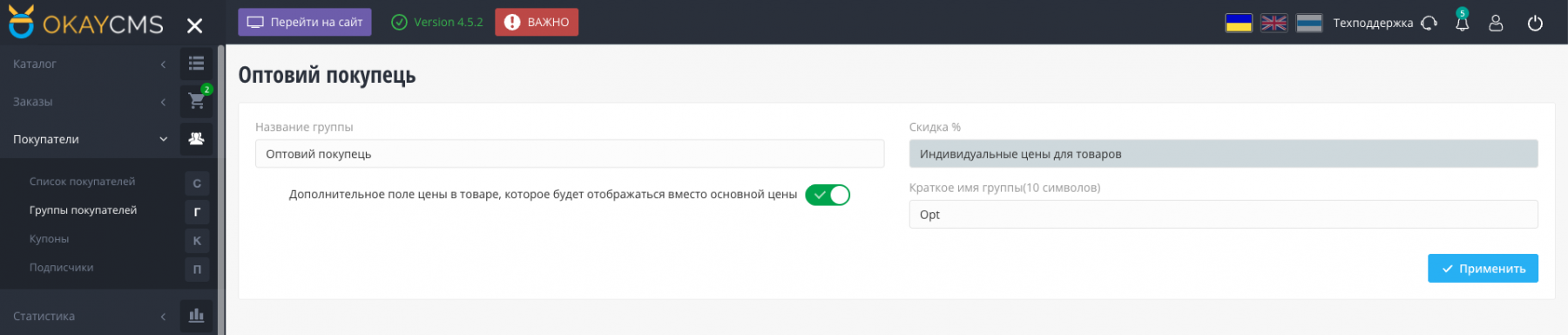
- go to Customers → Customer Groups;
- open the required group;
- enable the “Additional price field in the product that will be displayed instead of the main price” option;
- enter a short name for the group;
- save the changes.
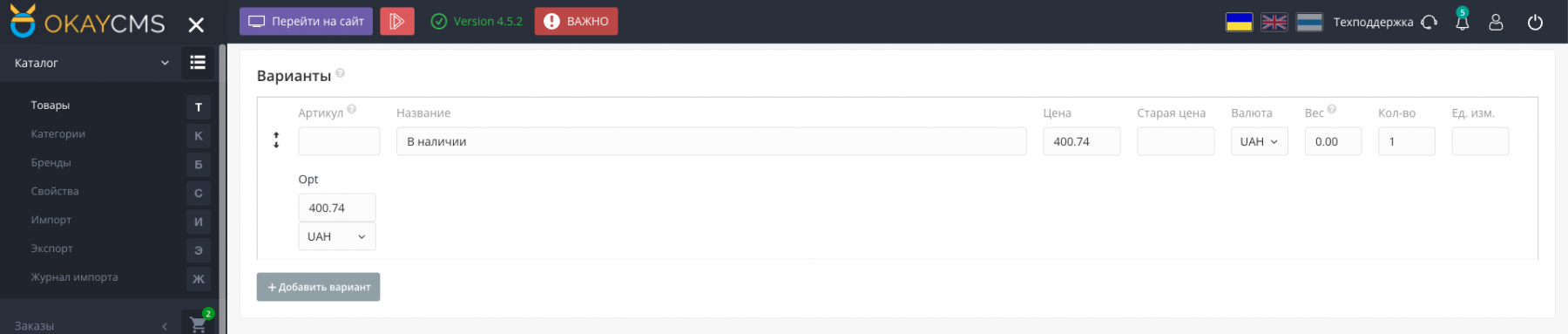
The short name will appear in the product card in the admin panel, making it clear which customer group the price belongs to.
Setting an individual price
After the additional field is enabled, a separate price for the selected customer group can be entered in the product card.
Each group can have its own prices for the required product variants. Customers belonging to that group will see these prices instead of the main prices.
Price import and export
When products are exported, additional fields with the group_price_ prefix are added. These fields contain the individual prices assigned to customer groups.
To update prices in bulk through import, map the appropriate file columns to the group_price_ fields added by the module.
Storefront display
Customers belonging to a configured group see the individual product price and can purchase the product at that price.
This allows the same product to have different prices depending on the customer group.
Who this module is for
The module is suitable for online stores working with retail and wholesale customers, regular customers, partners, dealers, or members of loyalty programs.
It simplifies the management of different pricing levels and allows prices to be updated in bulk without manually editing every product variant.

-
VIP Partner OkayCMS
-
Quality checked by OkayCMS
-
Does not require adaptation for other templates
Recommend

Configure wholesale discounts for products and individual variants in OkayCMS. Apply fixed or percentage discounts based on quantity or purchase amount.



К примеру цена в розницу в гривне, а вот оптовая цена, чтоб была в долларе? Выбор валюты есть возможность выбора для оптовиков?