
Product properties in the catalog
Product Properties in the Catalog — a module for OkayCMS that displays product properties directly in the product preview in the catalog.
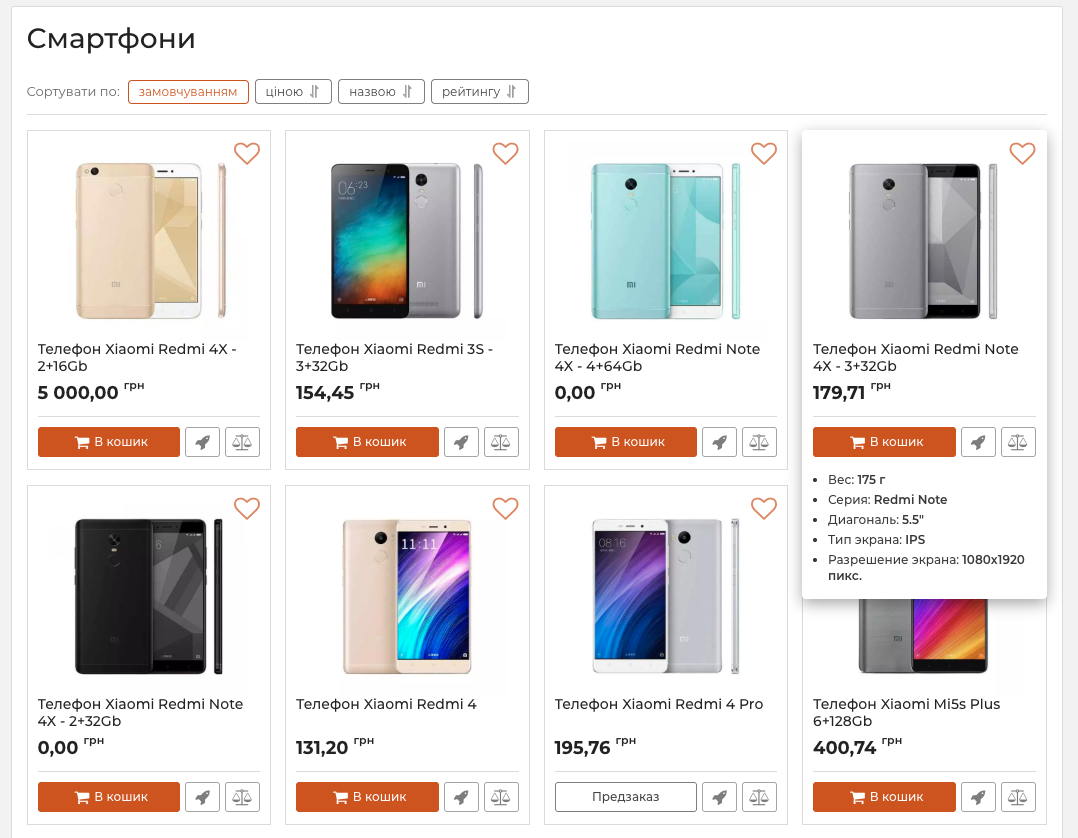
When customers hover over a product image, they can view its main properties without opening a separate page. This makes the catalog more informative and helps visitors evaluate and compare products faster.
Main features
- displaying product properties when hovering over its image;
- viewing product characteristics directly in the catalog;
- evaluating products without opening individual pages;
- more informative product cards;
- easier product selection and comparison.
How the module works
After installation and activation, the module starts working on the storefront.
When a visitor hovers over a product image in the catalog, the product properties appear in its preview. When the cursor leaves the product card, it returns to its standard appearance.
Catalog display
Product properties are displayed directly in product cards on catalog and category pages.
Customers do not need to open each product separately to view its main characteristics. The required information is available while browsing the catalog.
Who this module is for
The module is suitable for online stores selling products where characteristics, parameters, and other properties play an important role in the selection process.
It makes product listings more informative, helps customers find suitable products faster, and improves catalog usability.

-
VIP Partner OkayCMS
-
Quality checked by OkayCMS
-
Requires adaptation for other templates
Recommend

This module displays an alphabetical index for brands on the brands page. Pressing a letter scrolls to the list of brands

This module makes it possible to set in the admin panel the display color of the banner title and text.

This module displays the required number of recommended products for the main product.

This module allows adding a pop-up window for registration, authorization, password reminders, as well as the "remember me" option on the user side of the site.