
EVA Marketplace - order, status and tracking number integration
EVA Marketplace — order, status and tracking number integration is a module for exchanging orders between OkayCMS and EVA Marketplace through the Merchant API.
The module automates the import and processing of EVA orders in OkayCMS, two-way status synchronization, tracking number transfer, and management of orders that already exist in the CMS.
Main features
- authorization in the EVA Merchant API using JWT;
- automatic and manual import of EVA orders;
- incremental synchronization of new or modified orders only;
- retrieval of complete order information: customer, recipient, products, total, payment, delivery, address, tracking number, and comment;
- creation of new EVA orders in OkayCMS;
- manual linking of an EVA order to an existing OkayCMS order;
- protection against duplicate orders;
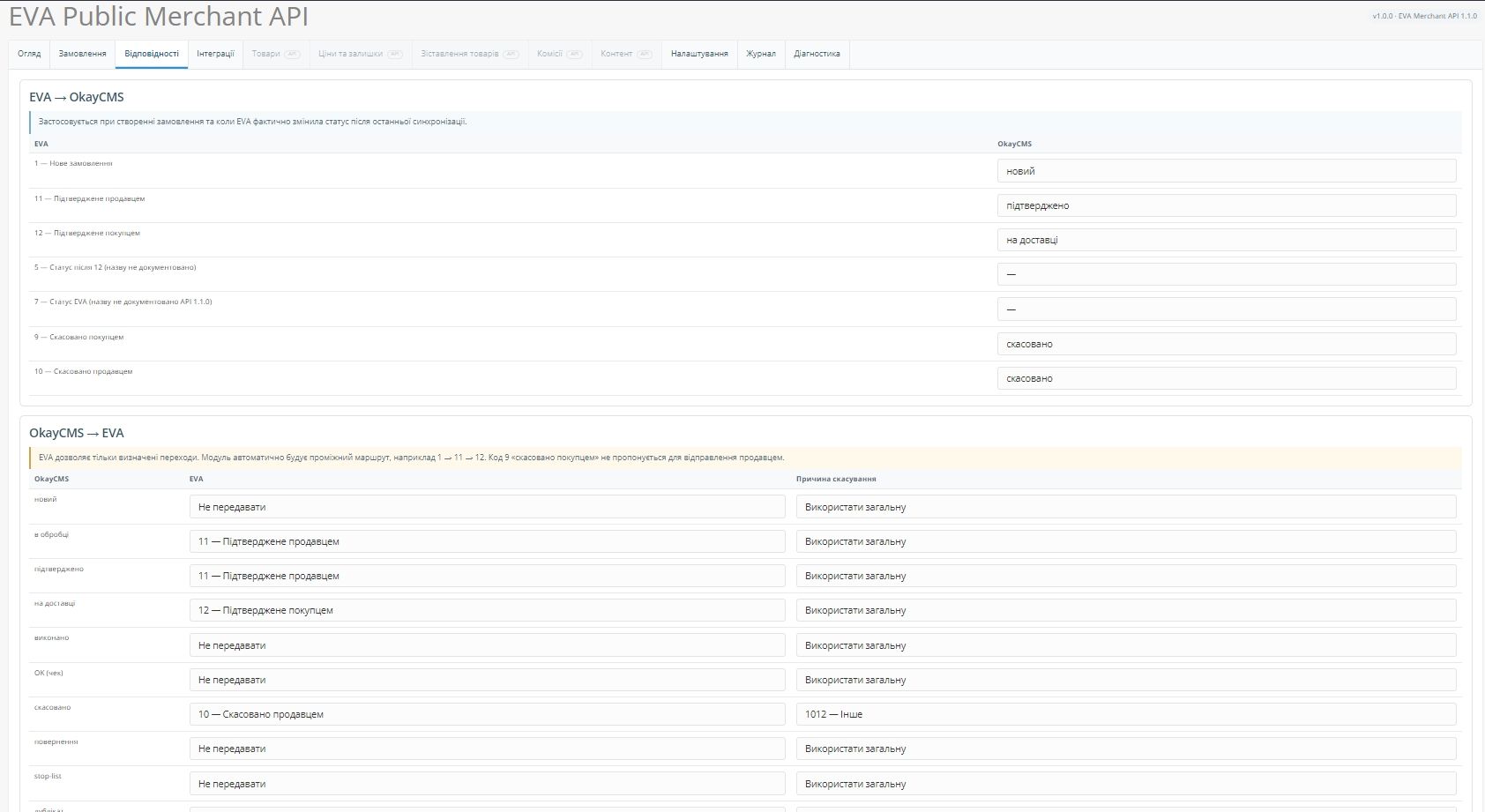
- two-way status synchronization;
- validation of permitted EVA status transitions;
- transfer of tracking numbers from OkayCMS to EVA;
- repeated tracking number transfer without reverting the current EVA status;
- support for EVA order cancellation reasons;
- a separate EVA information block on the OkayCMS order page;
- manual synchronization and diagnostic actions;
- API request and error logs;
- optimized Scheduler operation without unnecessary CMS or database load.
Integration with other modules
The module supports integration with the following solutions:
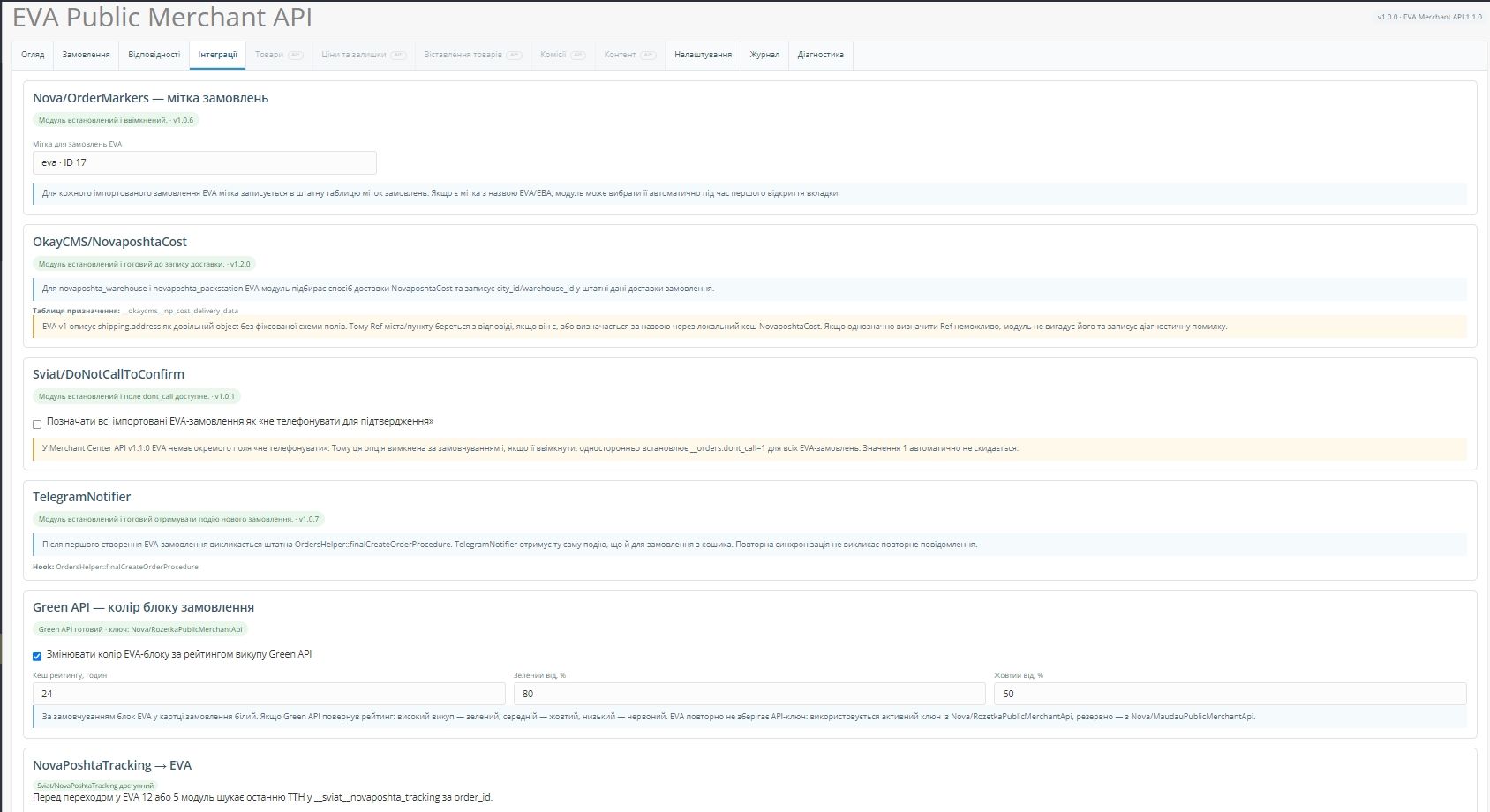
- Nova/OrderMarkers — automatically adds a marker to EVA orders;
- OkayCMS/NovaposhtaCost — provides Nova Poshta delivery data;
- Sviat/DoNotCallToConfirm — transfers the “do not call for confirmation” attribute;
- TelegramNotifier — sends the standard new-order notification;
- NovaPoshtaTracking — retrieves a tracking number created in OkayCMS;
- Green API through compatible Rozetka/Maudau modules — retrieves the customer purchase-completion rating and changes the information block color accordingly.
Manual order linking
For orders created in OkayCMS before the module was connected, the “Import all EVA orders” mode is available.
After importing the orders, the administrator can enter an existing OkayCMS order number and create the following link:
EVA order ID ↔ OkayCMS order ID
A manually linked order is not overwritten by the importer. Its products, prices, quantities, and local status selected by the manager remain unchanged.
EVA order information block
A separate EVA information block is displayed on the OkayCMS order page and contains:
- EVA ID and current status;
- order total and payment information;
- delivery method and address;
- tracking number;
- creation and update dates;
- order link type;
- synchronization information;
- EVA API errors.
The block has a white background by default. If a Green API rating is available, its color can change according to the customer’s purchase-completion rate.
Future functionality
The module interface already contains reserved but currently inactive sections:
- Products;
- Prices and stock;
- Product mapping;
- Commissions;
- Content.
These sections may be activated when the corresponding methods become available in the EVA Merchant API.

-
New Partner OkayCMS
-
Support is provided by a partner
-
Does not require adaptation for other templates
Recommend

A module for creating stable, SEO-friendly breadcrumb navigation in OkayCMS with schema.org/BreadcrumbList support, automatic product category selection, and appearance settings.

Run time-limited discount campaigns for categories, brands, or selected products, with automatic start and end times and a countdown timer on the storefront. No template modifications required.

A module for manual and automatic generation of product review texts using OpenAI, Google Gemini, Anthropic Claude, and xAI Grok.

A module for managing product and store reviews with pre-moderation, customer photos and videos, helpfulness voting, SEO, Google Customer Reviews, and automation.